
OnlyDividends Logo
OnlyDividends
OnlyDividends Logo
OnlyDividends
OnlyDividends dividend calendar illustration

Best dividend tracker apps for iPhone

The Best Dividend Tracker Apps for iPhone

Every app here runs on iPhone, but they fit different needs. For a simple, native, private iPhone app focused on dividend paydays and after-tax income, OnlyDividends is the pick. DivTracker adds detailed data, Stock Events adds broad market events, Snowball Analytics adds deep analytics, and The Dividend Tracker adds broker auto-import with a web companion.

Free for your first 3 stocks. No account, no bank linking.

Available Stock Exchanges

ASX LogoBCBA LogoBET LogoBME LogoBMV LogoCSE LogoEuronext LogoHKEX LogoJPX LogoKRX LogoLSE LogoMIL LogoNASDAQ LogoNYSE LogoPRA LogoSGX LogoSIX LogoTadawul LogoTSX Logo
01

Not every iPhone dividend app is built for iPhone

Several popular dividend trackers started on the web and added an iOS app later. They work on iPhone, but the experience can feel like a web dashboard on a small screen, with a login and extra setup.

Others are native iOS apps that open fast, send proper push notifications, and feel at home on the device.

If you want a dividend tracker that fits how you actually use your iPhone, that distinction matters.

02

What makes a good iPhone dividend app

A good iPhone dividend tracker is fast and native, sends pay-day notifications, and lets you add holdings quickly without a heavy setup. Privacy helps too, since not everyone wants to link a brokerage from their phone.

OnlyDividends is our own app, built natively for iPhone around exactly that. We are clear about where other iOS apps offer more depth or run on more platforms.

  • Native iOS experience vs a web app on a small screen
  • Pay-day push notifications
  • Fast manual setup vs broker linking
  • Forward dividend calendar and after-tax income
  • iPhone-only vs also Android or web
  • Free tier and pricing
The shortlist

Compared on how well each works as an iPhone app, with the job each one does best.

  1. 01

    OnlyDividends

    Best simple, native iPhone app

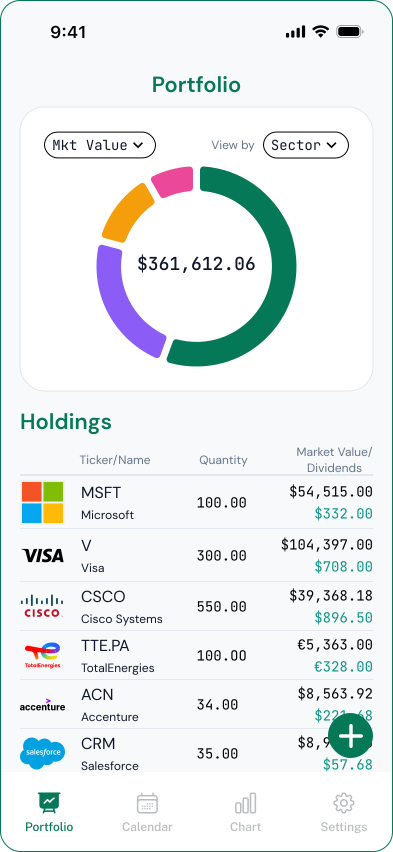
    Built natively for iPhone around dividend paydays and after-tax income, with native pay-day notifications and no bank linking. The simplest choice if you live on iOS.

    iPhone (iOS 16+)Free / ~$6.99 mo
    Download on the App Store
  2. 02

    DivTracker

    Best iPhone app for detailed data

    A well-reviewed iPhone and iPad app with a rich stock-data hub, forecasting, and optional US-broker import. Great if you want depth without leaving iOS.

    iPhone & iPadFree / $4.99–$6.99 mo
  3. 03

    Stock Events

    Best iPhone app for market events

    A polished, highly rated iOS app that tracks earnings, ratings, news, and dividends across your watchlist. Best if you want the whole market, not just dividends.

    iPhone & AndroidFree / $7.99 mo (PRO)
  4. 04

    Snowball Analytics

    Best iPhone app for analytics

    A capable iOS app backed by a full web platform, with broker sync, benchmarking, and risk metrics. Best if you want deep analysis that also syncs to the web.

    iOS, Android & webFree / $7.99–$24.99 mo
  5. 05

    Dividend Tracker: Stock Market

    Best if you also want Android

    A capable native app on both iPhone and Android, with manual or CSV entry, tax-adjusted projections, and income goals. A strong pick if you switch between platforms.

    iOS & AndroidFree + Premium
  6. 06

    The Dividend Tracker

    Best iPhone app with a web companion

    An iOS app paired with a web dashboard and broker auto-import from 500+ brokerages. Best if you want your phone and desktop in sync. Free tier is ad-supported.

    Web & iOSFree (ads) / $5.99–$16.99 mo
03

What to look for in an iPhone dividend app

  • 01

    Native and fast

    A native iOS app opens quickly and feels at home on iPhone, rather than loading a web dashboard in an app shell.

  • 02

    Pay-day notifications

    Proper iOS push notifications remind you when a dividend is paid, without opening the app.

  • 03

    Forward dividend calendar

    Look for upcoming payment dates and amounts shown ahead of time, right on your phone.

  • 04

    After-tax income

    An app that shows net income after withholding tax reflects what actually lands in your account.

  • 05

    Privacy

    Adding holdings manually keeps everything on your device, with no brokerage login from your phone.

  • 06

    Other platforms

    If you also use Android or a desktop, check whether the app extends beyond iPhone.

What to look for in an iPhone dividend app
05

Which iPhone app is right for you?

  • Want the simplest, most private native iPhone app? OnlyDividends
  • Want detailed dividend data on iOS? DivTracker
  • Want market events as well as dividends? Stock Events
  • Want deep analytics that sync to the web? Snowball Analytics
  • Want Android too? Dividend Tracker: Stock Market
  • Want an iPhone app plus a web dashboard? The Dividend Tracker

The Best Dividend Tracker Apps for iPhone

Free for your first 3 stocks. No account, no bank linking.

Download on the App Store

Frequently asked questions

For a simple, native, private iPhone app focused on dividend paydays and after-tax income, OnlyDividends is our pick. DivTracker is best for detailed data on iOS, Stock Events for market events, Snowball Analytics for analytics, and The Dividend Tracker if you want a web companion.

OnlyDividends, DivTracker, and Stock Events are built as native iOS apps. Snowball Analytics and The Dividend Tracker offer iOS apps alongside full web platforms, so the experience leans on the web side.

OnlyDividends sends native iOS notifications on each dividend pay day, and several others offer alerts too. Check each app’s current notification features, since they vary.

OnlyDividends never links accounts, and Dividend Tracker: Stock Market and DivTracker can be used with manual entry. The Dividend Tracker and Snowball Analytics are built around brokerage connections.

It varies by app. OnlyDividends runs on iOS 16 or later. Always check the App Store listing for each app’s current minimum iOS version.

Each has a free tier. OnlyDividends is free for up to 3 stocks, and the others offer free tiers with paid upgrades. The Dividend Tracker’s free tier is ad-supported.