
OnlyDividends Logo
OnlyDividends
OnlyDividends Logo
OnlyDividends
OnlyDividends dividend calendar illustration

How to track dividend payments

How to Track Your Dividend Payments

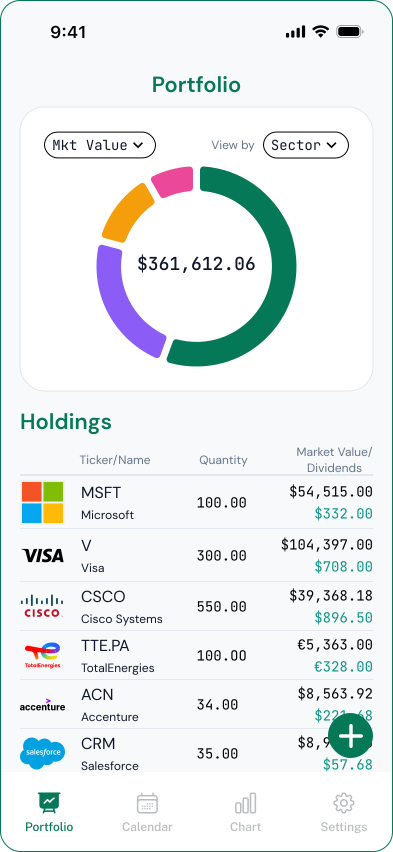
To track dividend payments, record each holding with its payout amount per share, payment frequency, and next payment date, then keep a running history of what has been paid and a list of what is upcoming. OnlyDividends does this for you: enter a ticker and your share count, and it tracks every payment by date and amount, shows the frequency, and reminds you when each one is paid, all without linking a bank or brokerage account.

Free for your first 3 stocks. No account, no bank linking.

Available Stock Exchanges

ASX LogoBCBA LogoBET LogoBME LogoBMV LogoCSE LogoEuronext LogoHKEX LogoJPX LogoKRX LogoLSE LogoMIL LogoNASDAQ LogoNYSE LogoPRA LogoSGX LogoSIX LogoTadawul LogoTSX Logo
01

Why individual payments slip through the cracks

Each holding pays on its own schedule, at its own amount, and brokerages bury that information inside transaction histories that mix dividends with trades, fees, and interest.

When you hold a dozen positions, keeping track of which one paid, how much, and when the next one is due turns into a manual job: cross-referencing pay dates, per-share amounts, and frequencies one stock at a time.

So payments get missed, amounts go unverified, and you never quite know whether you received everything you were owed.

02

Every payment tracked from a ticker and a share count

OnlyDividends records each holding as a stream of individual payments. You add a position with two fields, the ticker and how many shares you own, and the app fills in the payment dates, per-share amounts, and frequency from public market data.

You get a clear view of each payout: what was paid, what is coming next, and how often it repeats, with the net amount shown after tax.

  • Each payment tracked by date and per-share amount
  • Payment frequency shown for every holding (monthly, quarterly, and more)
  • A history of past payments alongside upcoming ones
  • Net amounts after a single withholding-tax setting
  • A notification on each pay day with the amount received
  • No bank login and no brokerage credentials, ever
03

How OnlyDividends tracks each payment

  • 01

    Payment-by-payment view

    See every individual payout with its date and amount, instead of a single blended number, so each payment is accounted for.

  • 02

    Pay-day notifications

    Get a reminder the moment each payment is due, showing the net amount, so nothing is missed or left unverified.

  • 03

    Frequency and amounts

    Each holding shows how often it pays and how much per share, so you always know what to expect from it.

  • 04

    No bank or brokerage linking

    Payments are built from public market data and your share counts, never from access to your accounts.

  • 05

    Ticker + shares setup

    Add a holding with two fields. No CSV imports, no transaction-history parsing, no manual lookups.

  • 06

    Global, multi-currency

    Track payments across 70+ exchanges in six currencies, each shown in the currency it pays in and yours.

How OnlyDividends tracks each payment
04

Ways to track dividend payments, compared

OnlyDividendsSpreadsheetBrokerage app
Each payment by date & amountYesManualBuried
Payment frequency shownYesManualRarely
History + upcoming togetherYesManualRarely
Pay-day notificationsYesNoRarely
After-tax amountsYesManualRarely
Bank / brokerage login requiredNoNoYes
Best forTracking payoutsPower usersBuying & selling
05

Who this is for

  • Dividend investors who want every payout accounted for
  • Income investors verifying amounts against what they expected
  • Monthly-dividend and ETF investors with frequent payments
  • Privacy-focused investors who refuse to link a bank or brokerage
  • Spreadsheet users tired of parsing transaction histories by hand

How to Track Your Dividend Payments

Free for your first 3 stocks. No account, no bank linking.

Download on the App Store

Frequently asked questions

Record each holding with its per-share payout amount, payment frequency, and next payment date, then keep a history of what has been paid. The simplest way is a dividend tracker like OnlyDividends, which does this automatically from a ticker and share count and notifies you on each pay day.

A dividend tracker keeps a payment history for you, listing each payout by date and amount as it is paid. OnlyDividends shows past payments alongside upcoming ones, so you have a continuous record without maintaining a spreadsheet.

Dividend payments are the individual payouts you receive, each with its own date and amount. Dividend income is the total of those payments over a period, such as a year. OnlyDividends tracks both: each payment individually, and the income totals they add up to.

OnlyDividends shows the next payment date for each holding and sends a notification when it is paid. You can also see all upcoming payments laid out by month, so you always know what is due next.

Yes. OnlyDividends never connects to a bank or brokerage. You add holdings manually with a ticker and share count, and the app tracks payments from public dividend data, so no credentials or account access are required.

Yes. A single withholding-tax setting adjusts every payment amount to its net value, including in pay-day notifications. This is a planning estimate, not a tax filing.

Yes. The free plan tracks payments for up to 3 stocks with the full payment view and notifications. Premium raises the limit to 50 stocks for about $6.99 per month or $49.99 per year.